One question we receive often is a request for guidance during the last leg of the project, actually publishing it to the wider web. While the instructions may appear daunting at first glance, it is actually fairly simple, though it requires client interaction as well as 24-hour wait.
In the Publishing menu of Easyling, you can configure the domain the translated site will be available on. You'll notice that changing the serving domain updates the values of the table below it. The contents of this table are what you'll have to send to the client, with instructions to insert the records provided into their own DNS settings. You'll also note that the settings are not yet saved - that will only happen with the actual publishing.
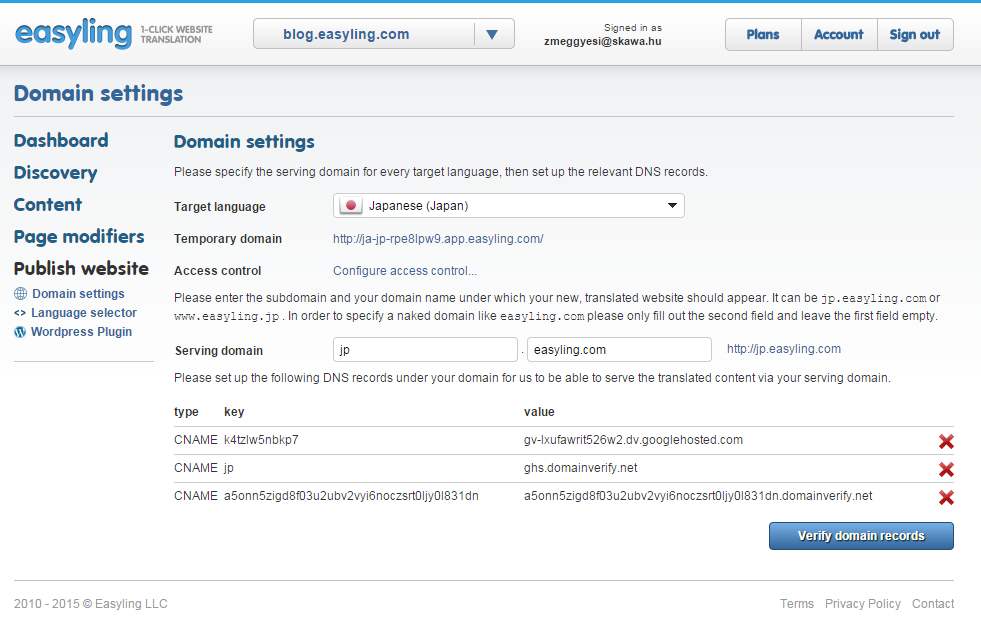
Once the settings are inserted, there is a waiting period, of at most 24 hours. This is because of the nature of the DNS servers at play - changes on one are not replicated all over the internet immediately, other server must query for changes before they are aware of the new site. Our servers must have a record of the newly published site before the proxy is able to serve it. This process usually takes a few hours, but it may take as many as 24, depending on the servers at play.
We recommend waiting out the full 24 hours before checking the publishing menu again. If you see three green ticks, just click the confirm button, and you'll be good to go. If you see a red cross in any of the rows, wait a while longer, or have the client confirm insertion and activation of the record in question, as it usually signifies a DNS problem. And if all else fails, our support team will gladly assist you in getting to the bottom of the issue.
If you're publishing a page that inherently uses a secure channel (for example, an ecommerce site - these are usually HTTPS by default), there is an additional step that needs to be done: we must be given the SSL certificate for the domain itself (this can be obtained from the client) in order to retain the authentication in one unbroken channel.
Furthermore, if the original domain is registered in Google Apps, there will be a need for additional configurations on the client's end. Because of this, we will need to contact the person who administers their Google Apps account and give them the necessary parameters.
0 Comments